Freelancer Invoice Generator
Professional Invoicing for Independent Professionals
Create professional invoices designed specifically for freelancers. Get paid faster with invoices that look great and include everything you need.
Download this template
Free to download, no signup and no email required.
The Word version is fully editable — add your logo, colours and terms.
The Excel version calculates line totals, tax and the grand total automatically.
Prefer not to download? Fill it in online and export a PDF in seconds. Create an invoice online
Invoicing that keeps up with freelance work
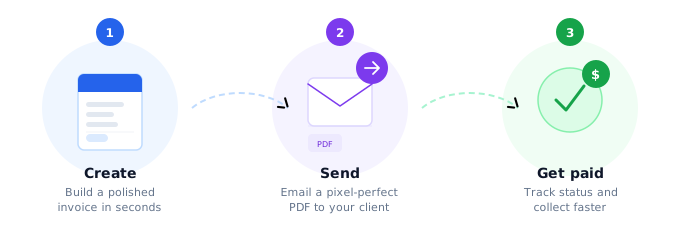
You need to look as professional as a large agency while working independently — often without accounting staff or dedicated billing software. Zap Bill handles the formatting, calculations, and tax math automatically, so every invoice looks polished and goes out in under a minute.
- No spreadsheet formulas or template hunting
- Branded, professional PDFs ready to send
- No monthly subscription required to get started
Why Freelancers Choose Our Invoice Generator
Designed by freelancers, for freelancers. Our invoice generator understands the unique needs of independent professionals.
Save Time
Create professional invoices in under 60 seconds. Spend more time on billable work, less on paperwork.
Get Paid Faster
Professional invoices get paid 30% faster. Clear payment terms and professional presentation encourage prompt payment.
Look Professional
Stand out from other freelancers with polished, professional invoices that reflect your expertise and attention to detail.
Work Anywhere
Create invoices from any device. Our mobile-friendly generator works perfectly on phones, tablets, and desktops.
Track Your Business
Keep organized records of all your invoices. Perfect for tax time and understanding your income patterns.
Easy Customization
Customize invoices to match your personal brand. Add your logo, choose colors, and make it uniquely yours.
Every invoice, tracked in one place
See at a glance which invoices are paid, sent, overdue or still in draft — so you always know exactly what you are owed and who to chase.

Invoice Templates for Freelancers
Choose from templates designed specifically for different types of freelance work
Modern Professional
Clean, contemporary design perfect for tech companies and modern businesses.
Creative Studio
Bold and colorful design perfect for creative agencies and freelancers.
Minimal Clean
Ultra-clean and minimalist design focusing on content and clarity.

Features Built for Freelancers
Everything you need to run your freelance business professionally
Project-Based Billing
- Multiple line items for different project phases
- Detailed service descriptions
- Flexible pricing structures
Tax Management
- Automatic tax calculations
- Support for different tax rates
- Tax-compliant invoice formats
Personal Branding
- Add your logo and contact details
- Consistent professional appearance
- Customizable color schemes
Freelancer Invoicing Tips
Pro Tip: Invoice Immediately
Send your invoice as soon as you complete the work or reach a project milestone. This keeps the value of your work fresh in the client's mind and improves your cash flow.
Track Your Success
- Keep records of all invoices sent
- Monitor payment times by client
- Analyze your most profitable projects
Client Communication
- Set clear payment expectations upfront
- Thank clients for prompt payments

Send a quote before you invoice
Win more work by sending a professional quote up front, then turn it into an invoice in one click once the client says yes.
Ready to Level Up Your Freelance Business?
Join thousands of freelancers who trust our invoice generator to help them get paid faster and look more professional.
Freelancer Resources
How to Create Professional Invoices
Complete guide to creating invoices that get you paid faster and look professional.
Invoice Best Practices
Professional tips and strategies for improving your invoicing process and cash flow.
Small Business Invoicing
Learn how to scale your invoicing as your freelance business grows into a small business.
Freelancer Invoice FAQ
Common questions from freelancers about creating and sending invoices
Do I need an account to create a freelancer invoice?
No. You can create and download a complete freelancer invoice with no account required. Sign up free to create 3 invoices every month, store client details, and reuse templates.
What should a freelancer invoice include?
A freelancer invoice should include your name and contact details, client name and address, invoice number and date, payment due date, a line-item breakdown of services with rates, any applicable taxes, and accepted payment methods.
Can I use this for hourly and project-based billing?
Yes. Zap Bill supports both hourly billing (quantity × hourly rate) and fixed-price project billing. You can mix both on the same invoice and add discounts or expenses as separate line items.
How do I add tax to my freelancer invoice?
Zap Bill automatically calculates tax when you set a tax rate (e.g. VAT, GST, or sales tax). You can apply tax per line item or to the whole invoice, and add your VAT/GST registration number for compliance.
Can I download my invoice as a PDF?
Yes. Every invoice generates a pixel-perfect PDF instantly. Download it for your records, email it to your client, or share a link — all without installing any software.
What payment terms should I use as a freelancer?
Net 15 or Net 30 are the most common payment terms for freelancers. For new clients or large projects, consider requesting a 25–50% deposit upfront. Always specify a due date on the invoice — "due on receipt" is too vague and leads to slower payment.
Is Zap Bill free for freelancers?
Yes. Create and download invoices for free — no credit card required. The free plan lets you create up to 3 saved invoices. Upgrade to unlimited invoices, client management, and dashboard tracking from £3.99/month.